How To Get More Traffic To WordPress Website (Beginner’s Guide That Works)
- How To Get More Traffic To WordPress Website (Beginner’s Guide That Works)
- Why ‘Build It’ Fails: How To Get More Traffic To WordPress Website The Right Way
- 🚀 Nail the Basics: SEO & Setup (The Foundation)
- Use a Good SEO Plugin & Submit Sitemap
- Choose SEO-Friendly URLs & Site Settings
- Make Your Site Fast & Mobile-Friendly
- Content That Helps You Increase WordPress Traffic Without Ads
- Find Useful Topics and Focus on Long‑Tail (Specific) Keywords
- Write Like You’re Talking to a Friend
- Use Internal Links
- Promotion Strategies To Increase WordPress Traffic Without Ads
- Share on Social Media (But Do It Smart)
- Build an Email List & Use Newsletters
- Guest Posts & Backlinks — Spread Your Net Wide
- 🔧 Keep Improving: Analyze & Optimize (Don’t Just Publish and Forget)
- Real Lessons: A WordPress Traffic Guide For Beginners
- ✅ The Traffic Checklist: What to Do Next
- 🚪 Conclusion: Real Traffic Isn’t an Accident — It’s a Strategy
In this WordPress Traffic Guide For Beginners, I’ll show you exactly how to Get More Traffic To WordPress Website without wasting money on ads. You’ll learn practical strategies to Increase WordPress Traffic Without Ads using SEO, content, and smart promotion—tested on real sites.
👉 Also READ: Free WordPress themes for business websites 2026
Why ‘Build It’ Fails: How To Get More Traffic To WordPress Website The Right Way
You know the old saying: “If you build it, they will come”? Sounds nice, but it rarely works in real life — especially online. The web is crowded. Theres thousands of sites that do what you do (or try to). If you just publish and wait, you’ll likely wait forever.
Instead, think of your site like a store in a huge city. You need to put up signboards, advertise, and make the place easy to find — otherwise, nobody stops by. That’s what we’re doing here.
So let’s get to the good part: how to make people find your site, stick around, and come back.
🚀 Nail the Basics: SEO & Setup (The Foundation)
If your house has no door, no one can enter. SEO and proper setup act as that door. Let’s open it properly.
Use a Good SEO Plugin & Submit Sitemap
Don’t ignore the power of an SEO plugin — it’s like having a friendly guide for Google. I use plugins such as AIOSEO (though many use Yoast SEO). These help you with on-page SEO, meta tags, sitemaps, schema, and more. WPBeginner+1
Once you have a sitemap (e.g. yourwebsite.com/sitemap.xml), submit it to Google Search Console. This tells Google exactly what pages you have — so they get crawled and indexed faster. WPBeginner+1
Choose SEO-Friendly URLs & Site Settings
In WordPress, make sure your permalinks are something like /post-name/ instead of weird numbers or dates. It looks cleaner and helps your SEO. WPBeginner+1
Also, double-check under Settings → Reading that you didn’t accidentally tick “Discourage search engines from indexing this site.” (Yeah — I once did that by mistake 😉) WPBeginner
Make Your Site Fast & Mobile-Friendly
Speed matters A LOT. A slow site kills user experience — most people will bounce (leave) if a page doesn’t load fast. According to recent data, many mobile users abandon sites that take more than 3 seconds to load. Qrolic Technologies+2Spark Studio+2
Use a lightweight theme, compress images, enable caching — these little tweaks pay off. Also make sure your site looks good and works well on mobile. With most traffic coming from phones these days, that’s non-negotiable.
Content That Helps You Increase WordPress Traffic Without Ads
Let’s be real: nobody visits your site to admire your code or plugins. They come for answers, value, or something interesting. So give them that.
Find Useful Topics and Focus on Long‑Tail (Specific) Keywords
Instead of “Get traffic,” aim for stuff like: “how to get free traffic to a WordPress blog without ads,” or “speed up WordPress for beginners 2025.” These longer, specific phrases (long‑tail keywords) often face less competition — so it’s easier to rank.
You can use free tools or plugins to help you find what people are searching for. (I don’t want to link them all here because Google might penalize weird plugins — but you know what I mean 😉)
Write Like You’re Talking to a Friend
When I read blog posts that feel like they were written by a robot — too formal, too dry — I close them fast. But if someone writes like a friend explaining something simple and real, I stick around.
So write with a relaxed tone. Use everyday words. Share personal stories or mistakes. YOU make the article unique.
Also, don’t be afraid of long‑form content (1,200–2,000+ words) when covering big topics. Longer articles tend to rank better — because they usually cover more angles and deliver more value.
Use Internal Links
Whenever you mention a related topic you’ve already covered (like “how to speed up WordPress” or “best free themes”), link back to those posts.
This does two things:
Keeps readers exploring your site longer (good for SEO and engagement)
Helps search engines see all your content as connected — improving overall authority
Promotion Strategies To Increase WordPress Traffic Without Ads
Writing great content is half the battle. The other half? Getting eyeballs on it.
Share on Social Media (But Do It Smart)
Don’t just post a link — treat it like a mini‑announcement. Use a catchy headline, a nice image, maybe a question to draw people in. Share on platforms where your audience hangs out.
For example, if you’re targeting other web designers or freelancers, Twitter or LinkedIn might work well. If you’re going after younger folks or creatives — maybe Facebook, TikTok, or Instagram.
Research (even academic) shows that social media shares and mentions help drive traffic — especially in the first hours/days after publishing. arXiv+1
Engage with comments, reply to questions — don’t just drop the link and forget it. That human touch builds trust and keeps people coming back.
Build an Email List & Use Newsletters
Imagine having dozens (or hundreds) of people who already like your content — and are willing to read whatever you publish next. That’s what an email list gives you 💡
You can offer something simple: a free checklist, a mini-guide, or exclusive content — in exchange for their email. Then when you publish a new post, send a short, friendly email to let them know.
Email subscribers tend to click through and read more. It’s a dependable traffic source that doesn’t depend on search engines.
Guest Posts & Backlinks — Spread Your Net Wide
Guest posting on other blogs or websites gets your content in front of new audiences and builds your site’s authority (because of backlinks). GuestPostOn+2Setproduct+2
When you write a useful article on someone else’s site — ideally related to your niche — and link back to your site, you get:
New readers who click your link
SEO “juice,” because high-quality backlinks signal authority to Google
Potential ongoing traffic as people discover the post over time
Just make sure the sites you guest post on are legitimate — high-quality, relevant, and not spammy.
🔧 Keep Improving: Analyze & Optimize (Don’t Just Publish and Forget)
You don’t build a blog and “set it and forget it.” Treat your site like a project.
Use Analytics to Understand What Works
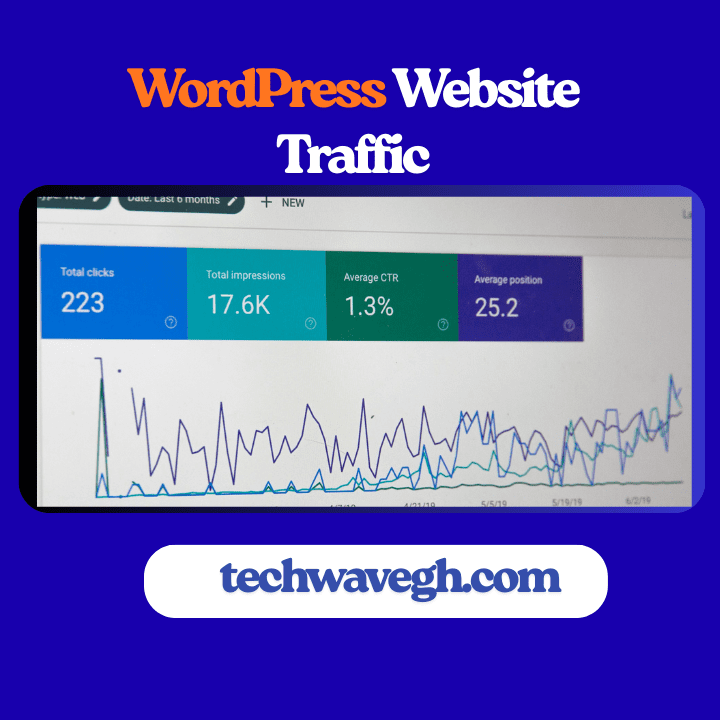
Install something like MonsterInsights or just use Google Analytics directly. Track which posts get traffic, where visitors come from, how long they stay, and where they leave.
That gives you real data — not guesses — about what content your audience likes. Double down on what works. Fix or update what doesn’t.
Update & Republish Old Content
Some of your older posts might still have potential — maybe they addressed a trending topic, or maybe search interest changed. Revisit them: update facts, improve readability, maybe add new images or expand content.
Google likes fresh and relevant content. Updating old posts can sometimes give them a second life.
Clean Up & Optimize Regularly
Make sure your site stays fast (compress images, remove unused plugins, use caching), secure (updates, SSL, secure plugins), and easy to navigate (clear menus, internal links, readable layout).
A slow, bloated, insecure site drives people away — and kills SEO (yes, Google notices). Qrolic Technologies+2IP Location+2
Real Lessons: A WordPress Traffic Guide For Beginners
I’ve built and helped build a few WordPress sites. Some took off quickly. Some… well, I learned a lot (the hard way 😅).
Here’s what I learned:
The sites that grew steadily weren’t the ones with fancy themes or expensive plugins. They were the ones with useful content + good SEO + constant promotion + patience.
Rush a launch, skip SEO setup, and expect magic — that never works.
Write content you believe in. Write for real people, not algorithms. That authenticity shows and keeps people coming back.
Don’t rely on one channel (say, search engines) only. Use a mix — social media, email, guest posts, communities. Diversify.
✅ The Traffic Checklist: What to Do Next
Before you go off to write your next post — do a quick audit using this checklist:
Install and configure an SEO plugin (AIOSEO or Yoast).
Submit a sitemap to Google Search Console.
Ensure permalinks are SEO-friendly.
Choose a lightweight, fast theme — optimize images and enable caching.
Make sure site is mobile-friendly.
Find a useful topic and write content with long‑tail keywords.
Use internal links for site structure.
Share your post on social media + relevant communities.
Build or grow an email list & send newsletters.
Write guest posts on related blogs to gain backlinks and exposure.
Monitor analytics — see what works, what doesn’t.
Update old posts regularly — keep content fresh.
If you do these consistently, you’ll start seeing actual growth. Maybe not overnight, but steadily.
👉 Also READ: How to fix WordPress errors (step-by-step)
🚪 Conclusion: Real Traffic Isn’t an Accident — It’s a Strategy
Now you have a complete WordPress Traffic Guide For Beginners that actually works. You know exactly how to Get More Traffic To WordPress Website through SEO, content, and promotion. And most importantly, you understand how to Increase WordPress Traffic Without Ads—building sustainable growth that doesn’t disappear when your budget runs out. Start with one strategy today, stay consistent, and watch your traffic grow.