

How to Check MTN Number, Balance, and Data (3 Simple Codes)
So you just bought a new MTN SIM, popped it into your phone, and now you’re staring at the screen thinking… “What’s my number again?”
- How to Check MTN Number, Balance, and Data (3 Simple Codes)
- Quick Reference Table: The Only 3 Codes You Need
- How to Check MTN Number (Because Forgetting Happens)
- How to Check MTN Balance (So You Never Run Out)
- How to Check MTN Data Balance (Track Your Gigabytes)
- Complete List of Useful MTN USSD Codes
- What If the Codes Don’t Work?
- Smartphone vs. Feature Phone: Does It Matter?
- Frequently Asked Questions
- Do I need the internet to use these codes?
- Are these codes free?
- Can I check another person’s balance?
- What if I dial the wrong code?
- How often should I check my data balance?
- Final Thoughts
We have all been there. 😅
 ALSO READ: How to Block Lost or Stolen MTN SIM Immediately (Do This Now)
Maybe you borrowed a friend’s SIM, or you just have a terrible memory for digits (guilty as charged). Either way, you need to check MTN number, balance, or check MTN data balance fast.
Good news? You don’t need an app, internet, or even a smartphone. The right MTN USSD codes do everything in seconds. And the MTN balance code works instantly – no menus, no typing.
Let me show you the three magic codes that solve all these problems. I use these codes daily, and I promise they will save you from embarrassing moments.
Quick Reference Table: The Only 3 Codes You Need
Before we dive into details, here is your cheat sheet. Bookmark this page or screenshot this table.
| What You Want | USSD Code | What Happens |
|---|---|---|
| Your MTN phone number | Dial *156# Then press 1 |
You receive an SMS with your number instantly |
| Main account balance | Dial *124# |
Your balance appears on screen |
| Data balance | Dial *138# then press 2, then 1 |
You see your remaining data and expiry date |
Ever wondered why MTN uses these specific codes? Honestly, I don’t know either. But they work like a charm. 🙂
How to Check MTN Number (Because Forgetting Happens)
Let me start with the most embarrassing one – forgetting your own phone number.
The Code: *156#
I once gave someone the wrong number at a networking event. They tried calling me three times, and I sat there wondering why my phone wasn’t ringing. Don’t be me.
Here is exactly what you do:
Step 1: Open your phone’s dialer
Step 2: Dial *156# and press call
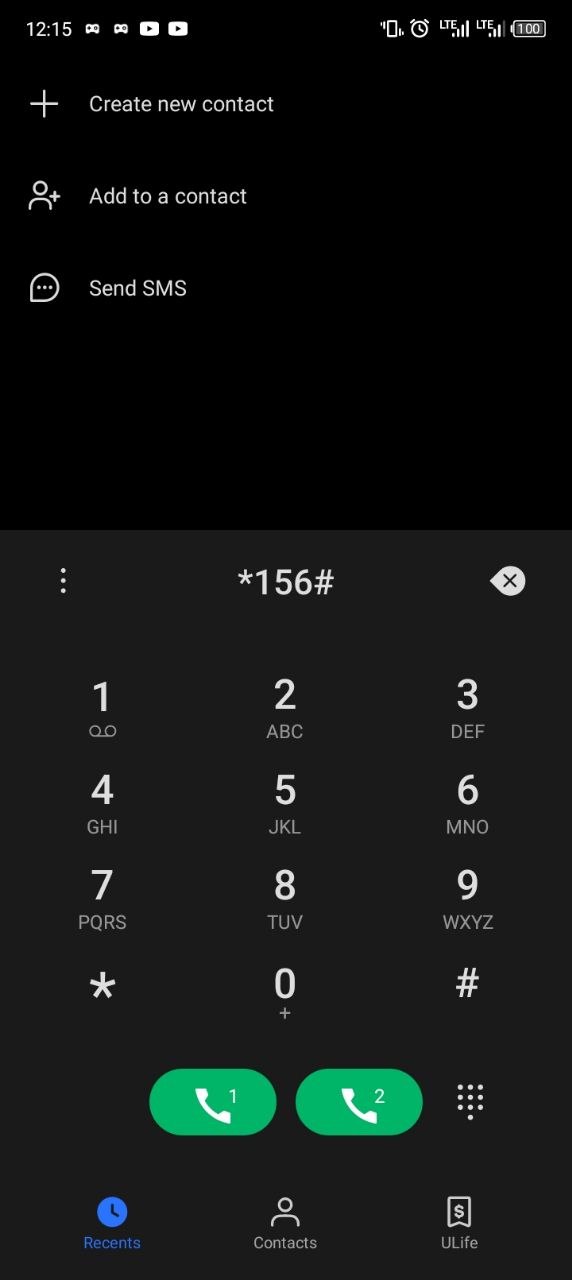
Step 3: Select option 1 (My Number)
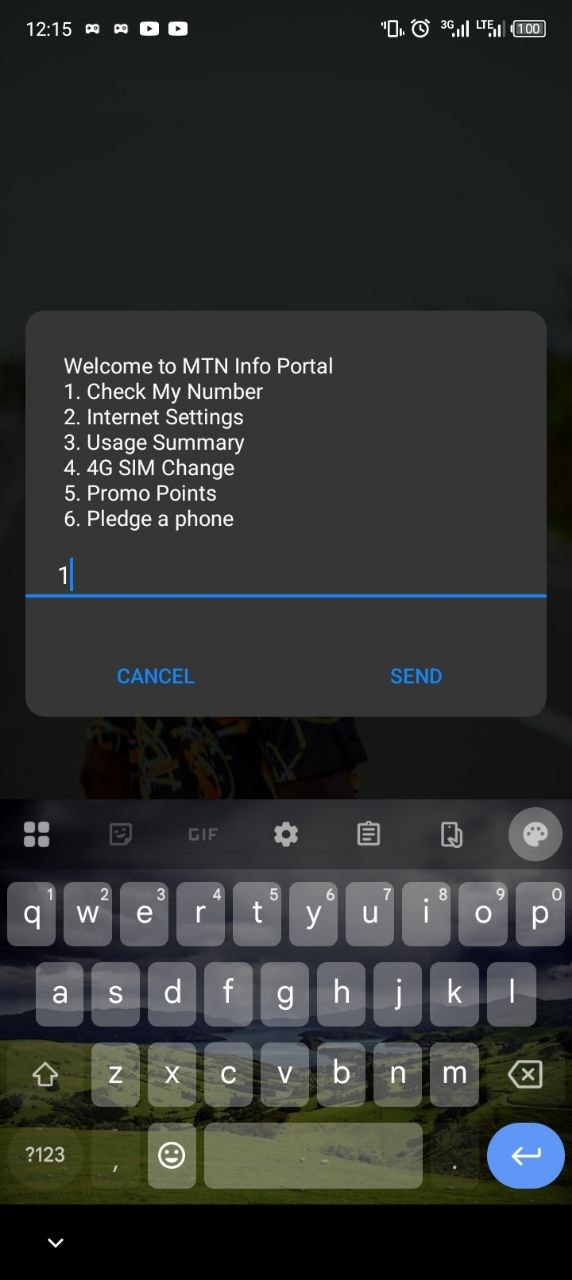
Step 4: Wait for the MTN Message screen to arrive
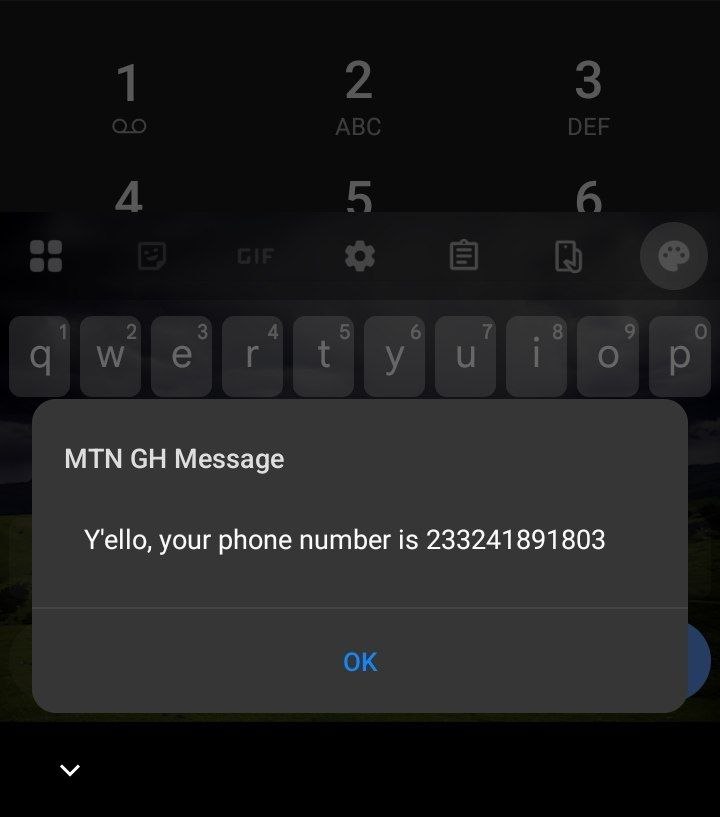
Within seconds, MTN sends you an SMS containing your phone number. No internet required. No app needed.
This works on any phone – smartphone, feature phone, or that old Nokia collecting dust in your drawer 😅.
Why This Code Saves the Day
Imagine you just landed in Ghana and bought a prepaid MTN SIM at the airport. The seller registers it for you, but you forget to save the number. Now you need to give it to your driver or family member.
Instead of panicking, you dial *156# and boom – problem solved.
This is the most underrated MTN USSD code. People focus on data and balance checks, but knowing your own number is literally the first step to using your phone. 😂
How to Check MTN Balance (So You Never Run Out)
Nothing frustrates me more than getting that “insufficient balance” message when I am about to make an important call.
The MTN Balance Code: *124#
Checking your main account balance takes less than 5 seconds. Here is how:
Step 1: Dial *124# from your MTN line
Step 2: Press call/send
Step 3: Your balance appears instantly on your screen
That’s it. No menus. No options. Just your balance staring back at you.
When Should You Use This Code?
| Situation | Why Check Balance |
|---|---|
| Before an important call | Avoid getting cut off mid-conversation |
| Before buying a data bundle | Make sure you have enough airtime |
| After recharging | Confirm your credit is actually loaded |
| At the end of the month | Track your spending on calls and texts |
I personally check my balance every morning. Call me crazy, but I hate surprises when I need to make an urgent call.
What Does the Balance Include?
Your MTN balance code reveals your main account – the credit you use for:
Voice calls to other networks
International calls
Daily SMS charges
Some data subscriptions (if you use pay-as-you-go)
Important note: This balance is not your data balance. Those are two different things. Don’t confuse them like I did when I first started using MTN. 🙃
How to Check MTN Data Balance (Track Your Gigabytes)
Data is expensive. Wasting it without knowing hurts your pocket.
The Code: *138#
Unlike the main balance code, checking your MTN data balance requires navigating a short menu. Don’t worry – it takes 10 seconds.
Step 1: Dial *138# and press call
Step 2: Select option 2 (Data Balance)
Step 3: Select option 1 (My Data Balance)
Step 4: Read the on-screen message with your remaining data and expiry date
The system will show you:
How many gigabytes or megabytes remain
When your current data plan expires
Any active daily, weekly, or monthly bundles
Why You Should Check Your Data Regularly
Ever streamed a video thinking you have unlimited data, only to get a “you have exhausted your data bundle” message mid-video?
Yeah, me too. 😅
Here is my rule: I check my data balance every time I:
Watch a video on YouTube
Download an app update
Use my phone as a hotspot
Notice the internet is slowing down
This habit saved me from buying emergency data bundles at 2 AM when all the shops are closed.
Pro Tip: Check Before Streaming
Before you open that 4K video on YouTube, dial *138# and confirm you have enough data. Your future self (and your wallet) will thank you.
Complete List of Useful MTN USSD Codes
Beyond the three main codes, here are other MTN USSD codes that come in handy.
| Purpose | USSD Code | What It Does |
|---|---|---|
| Buy a data bundle | *138# then option 1 |
Shows all available data plans |
| Share data | *138# then option 3 |
Transfer data to another MTN number |
| Check MoMo balance | *170# then 6 then 3 |
Shows mobile money balance |
| Buy airtime for someone else | *143# then 2 |
Purchase airtime for another MTN user |
| Check SIM registration status | *400# |
Confirms if your SIM is properly registered |
| Borrow airtime (Emergency credit) | *506# |
Get small credit when you run out |
Bookmark this table. I still refer to it sometimes when my brain decides to forget everything.
What If the Codes Don’t Work?
Sometimes technology fails us. Here is what to do if these codes stop working.
Check Your Network Signal
No signal = no USSD service. Move to an area with better MTN coverage and try again.
Restart Your Phone
A simple restart fixes 90% of phone problems. Turn your phone off, wait 10 seconds, and turn it back on.
Dial Slowly
Typing codes too fast sometimes confuses the system. Dial *156# slowly and wait a second before pressing call.
Contact MTN Customer Care
If nothing works, dial 100 from your MTN line. Their customer service agents can help you check your number, balance, and data manually.
Honestly, I have used MTN for years, and the codes have failed me maybe twice. Both times, a quick restart solved the problem.
Smartphone vs. Feature Phone: Does It Matter?
Here is the beautiful thing about MTN USSD codes – they work on every phone.
| Phone Type | USSD Works? | Notes |
|---|---|---|
| iPhone (iOS) | ✅ Yes | Works perfectly |
| Samsung/Android | ✅ Yes | Works perfectly |
| Nokia feature phone | ✅ Yes | Smaller screen but same menus |
| Any basic phone | ✅ Yes | As long as it makes calls |
I activated my grandmother’s MTN SIM on her old Tecno phone. She checks her balance *124# like a pro now. No smartphone required. No app downloads. No internet needed.
Frequently Asked Questions
Do I need the internet to use these codes?
No. USSD codes work over the cellular network, not the internet. You can use them even with zero data balance.
Are these codes free?
Yes. MTN does not charge you for dialing *156#, *124#, or *138#. The service is completely free.
Can I check another person’s balance?
No. You can only check your own MTN number’s balance. Each SIM requires its own verification.
What if I dial the wrong code?
Nothing bad happens. The system shows an error message like “Invalid code.” Just try again with the correct one.
How often should I check my data balance?
I recommend checking daily if you use data frequently. A quick *138# check takes 10 seconds and prevents unexpected exhaustion.
ALSO READ: How to Activate MTN MoMo After SIM Registration (No Agent Needed)
Final Thoughts
Checking your MTN number, balance, and data balance does not require a degree in rocket science. Three simple MTN USSD codes – *156#, *124#, and *138# – do the job in seconds. The MTN balance code (*124#) gives you instant credit info, while *138# helps you check MTN data balance without breaking a sweat.
I have used these codes hundreds of times. They saved me from:
Giving out the wrong phone number (embarrassing!)
Running out of credit during important calls (frustrating!)
Watching my data disappear without warning (expensive!)
So go ahead. Dial *156# right now and check MTN number. Then try *124# (your reliable MTN balance code) to see your credit. Finally, hit *138# and check MTN data balance before streaming that video.
Five minutes from now, you will be an MTN USSD codes pro. 😎
Got a favorite code I missed? Or did one of these not work for you? Drop a comment below – I read every single one.
Now go, master those codes! 🚀